On-Premises Personal Agents
Run your own personal-agent platform on your own servers, giving each employee or customer a personalized agent that remembers them and acts for them within the permissions you set.
LIVE
Hosted services running on FinAI OS today. Try them in your browser, sign up, and go live without deploying anything.
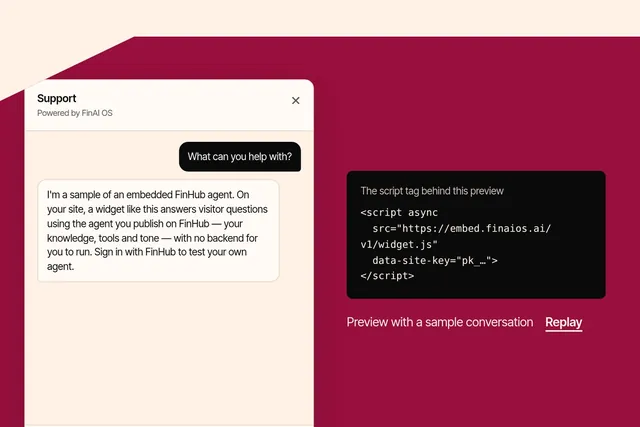
Put an agent you publish on FinHub onto any website with one script tag, in your brand and your visitors' language. Try the playground or sign up at embed.finaios.ai.
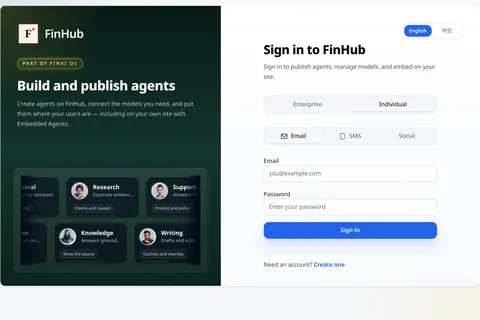
FinHub is the governance and work plane for your company's agents, including the Super Agent work layer. Policy, identity, audit and skills stay on the platform, so you are not locked to one harness.
Solutions
Give your professionals one desktop under your institution's identity, rather than a collection of unrelated chat windows. FinDesk brings agent assistance, documents and business tools into a configurable workstation. Our Forward Deployed Engineers (FDEs) assemble and deploy the branded distribution with your team, around the work people actually need to do.
Ways to start
your technical team can use the distribution template and packaging SDK to understand the host, shell and plugin contracts. This download is a developer SDK, not an end-user app installer.
choose a professional role, your brand and an existing business service. FDEs build the first workstation with your team, including a scoped adapter and clear operating responsibilities.
Solutions
Start the day with work items and institution-selected tools in one frame. Move from an application into agent assistance with deliberately selected context. Prepare a document, inspect the result and return to the business workflow without treating every application as another chat session.
The aim is continuity of work, not unrestricted agent access. A tool visible to a person can remain unavailable to the assistant; a connected service can expose only the operations the institution chooses.
Solutions
Work queue · Documents · Business applications · Agent assistant. A professional opens a document and asks for help with selected context, then reviews the result before using it.
Enabled plugins · Explicit tool attachments · Brand · Organisation endpoints. The institution selects the tools people see and separately decides which registered tools an agent session may use. Showing an application does not grant the agent its authority.
Architecture
These are architecture layers, not security grades:
the stable platform contract, registries and mediated host services.
the desktop frame—sidebar, top bar, layout and routing mounts—which places registered plugin contributions.
a bounded business surface with navigation and a view, plus an optional backend-for-frontend (BFF), binary sidecar or Model Context Protocol (MCP) tools.
A distribution selects the shell, enabled plugins, brand and policy. The shell does not select the plugin set by itself. Existing services connect through purpose-built plugin UI and explicit adapters, with an optional BFF or host-supervised sidecar. This is not a promise that every website embeds unchanged.
plugins use scoped host APIs, and privileged operations are checked in the main process. Declaring an agent tool is separate from attaching it to a session: attachment is opt-in and off by default. Execution isolation for local agents comes from FinShield and FinSafe.
Distribution
Set the product name, application identity, logos, theme, locale and enabled optional plugins. Add institution-private workflows, configure endpoints and policy, and package platform-specific installers for macOS, Windows and Linux according to the chosen SDK and architecture.
Your institution owns its distribution repository, assets, private plugin source and release identity; the proprietary platform core remains separately supplied. Pin the SDK and sidecar versions to manage upgrades. Local-only configuration and hosted services are explicit choices, not a blanket promise that every connected workflow runs offline.
Products
Professionals review outputs; the institution reviews plugins, context sharing, tool attachments and configured endpoints. Treat agent access and human application access as separate decisions. FinDesk stands alone; other products are optional.
Runtime and business-tool choices are separate from the desktop brand. Scope compatible connections rather than assume every runtime or action is automatically covered.
FDE
FAQ
No. FinDesk combines a desktop frame, business plugins and agent assistance under your institution's brand.
Yes. Scope UI and optional BFF/sidecar adapters around existing services; integration is not universal drop-in embedding.
Your distribution identity, assets, configuration and private plugin source—not proprietary platform-core source.
No. Tool registration and session attachment are separate. Host checks and local-agent isolation also have different roles.
Use a pinned SDK and your distribution configuration to build platform-specific installers. FDEs deliver the setup and update process; the public SDK is not an app installer.
Solutions
Bring your research workflows, data sources and professional tools; shape the next layer with our FDEs.
Next step
Talk to an FDE about your brand, workflows and first private integration.